> For the complete documentation index, see [llms.txt](https://docs.nextype.finance/llms.txt). Markdown versions of documentation pages are available by appending `.md` to page URLs; this page is available as [Markdown](https://docs.nextype.finance/tutorial/how-to-switch-to-bsc-testnet/configure-bsc-test-network-in-token-pocket.md).
# Configure BSC Test network in Token Pocket
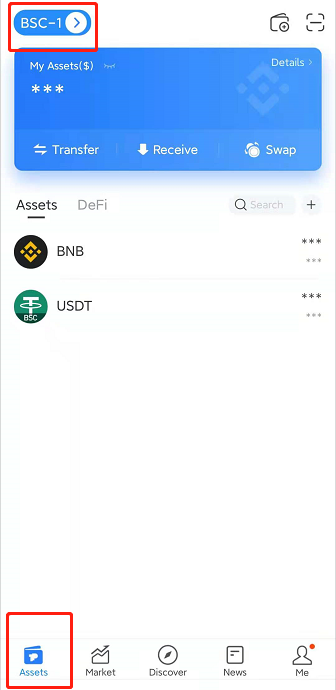
1\. Click **\[Assets]** and select your **BSC** address with whitelist qualification.
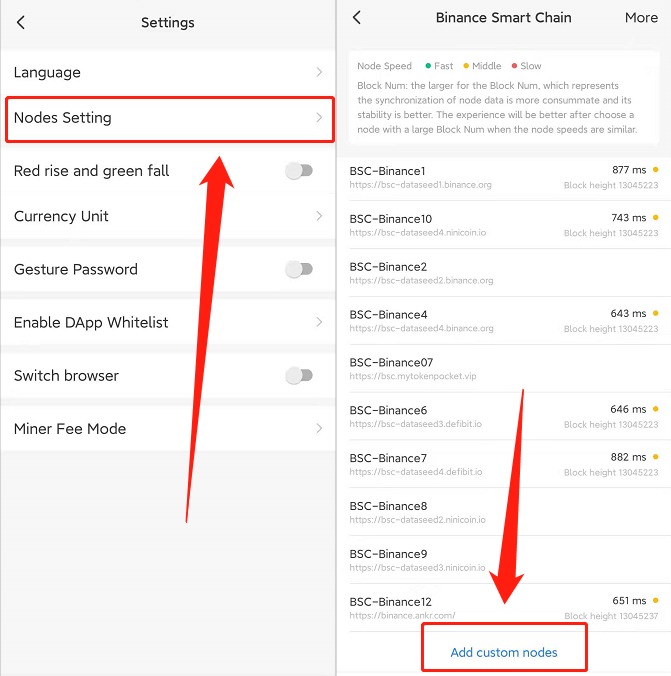
2\. Click **\[Me]**, select **\[Settings]**
3\. Click **\[Node Setting]**, and **\[Add Custom Nodes].**
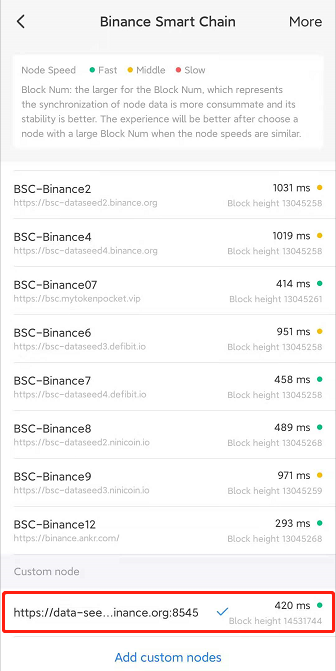
4\. Copy this link and paste it in the blank of **\[Add custom nodes]** to **\[Confirm]:**\
[**https://data-seed-prebsc-2-s1.binance.org:8545**](https://data-seed-prebsc-2-s1.binance.org:8545)

5\. Select the network node that you just added. The ✔ will appear when the selection is successful.
6\. Back to the homepage to add Test Token.
**NXTP (Test Token representing NT) Contract Address:** 0x7d39b9c548b4d8140c958a56ad6ca7d7b82a863f